 AvailableAvailable on iPhone
Cooking utilities
Recipe Portion Scaler — scale recipes to the servings you need
Recipe Portion Scaler is a recipe calculation and organisation utility from Three Two One Global. It helps you scale ingredient quantities for different serving sizes and keep recipes organised locally on your iPhone.
Scale ingredient quantities, paste ingredient lists, convert common measurements and save recipes locally — without turning cooking maths into a nutrition or medical tool.
A recipe-scaling utility — not medical, nutritional, allergy or food-safety advice.

Overview
A practical recipe serving calculator
Recipe Portion Scaler is built for a simple job: take the servings a recipe was written for, set the servings you need, and scale the ingredients accordingly. It is a measurement utility, not a cookbook, meal planner or nutrition app.
Recipe Portion Scaler is a recipe calculation and organisation utility from Three Two One Global. Enter original and desired servings, add or paste ingredients, review parsed results, convert supported units and save recipes locally — with an optional lifetime unlock for unlimited saved recipes.
Details
What you can do
Scale ingredient quantities
Enter original servings and desired servings, then scale whole numbers, decimals, fractions, mixed numbers and quantity ranges. Review the results before you cook or shop.
Paste, review and convert
Paste ingredient lists from the clipboard, correct parsed ingredients before importing, convert supported common weight and volume units, and switch between Metric and US Customary measurements.
Save locally — unlock unlimited saves once
Save recipes on your iPhone, add an optional photo, and search or organise what you keep. Free includes up to five saved recipes. Recipe Scaler Plus unlocks unlimited saves with a one-time lifetime purchase — not a subscription.
Product
From servings to scaled ingredients
Scale a recipe, keep saved recipes ready to reopen, adjust measurement settings and unlock unlimited local saves when you need them.
01 · Scale recipe
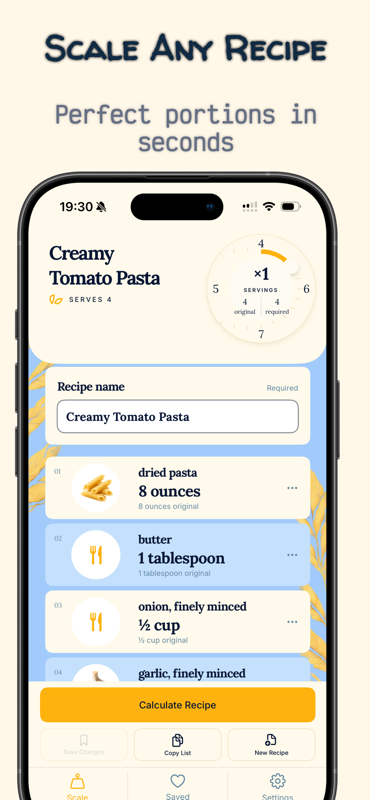
Scale any recipe — set servings, review ingredients and calculate scaled quantities.
02 · Saved recipes
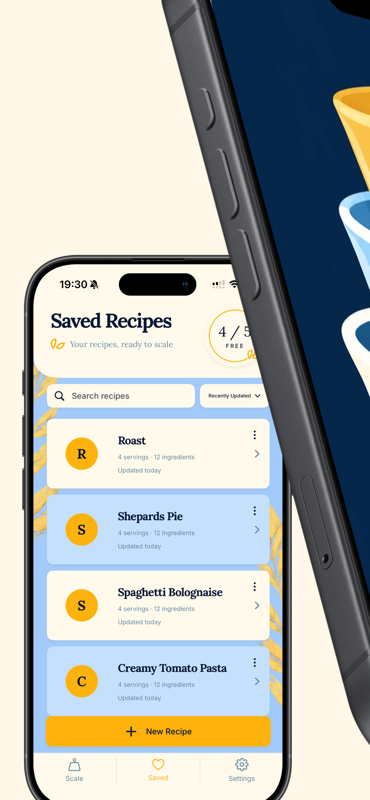
Saved Recipes — search, organise and reopen recipes you keep locally on your iPhone.
03 · Measuring cups
Recipe Portion Scaler branding — scale portions with a simple measuring-utility focus.
04 · Settings
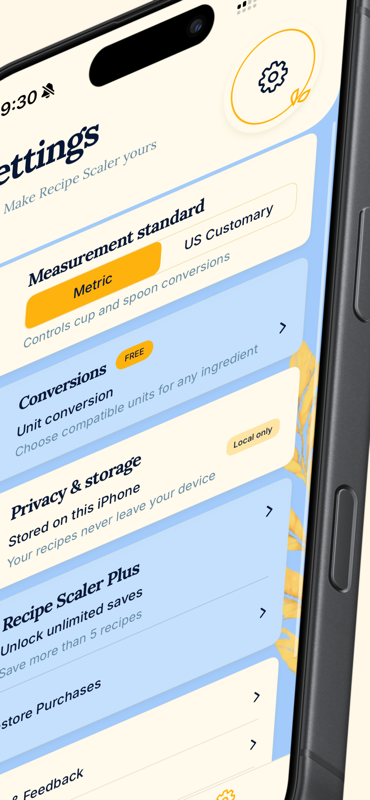
Settings — Metric or US Customary measurements, conversions, local-only storage and Recipe Scaler Plus.
Features
What you can do
Scale to your servings
Enter original and desired servings, then scale ingredient quantities — including whole numbers, decimals, fractions, mixed numbers and quantity ranges.
Paste and review ingredients
Paste an ingredient list from the clipboard, then review and correct parsed ingredients before importing.
Convert common measurements
Convert supported common weight and volume units, and switch between Metric and US Customary measurement options.
Copy scaled lists
Copy scaled ingredient lists so you can use them elsewhere when shopping or cooking.
Save recipes locally
Save recipes on your iPhone, then search, rename, duplicate or delete them. Add an optional recipe photo with Apple's photo picker.
Lifetime unlock — no subscription
Save up to five recipes for free. Unlock unlimited saved recipes with a one-time lifetime purchase — not a recurring subscription.
Process
How Recipe Portion Scaler works
Step 01
Set the servings
Enter the original servings and the servings you actually need.
Step 02
Add or paste ingredients
Enter ingredients manually or paste a list, then review parsed items before importing.
Step 03
Calculate, copy or save
Scale the quantities, convert supported units where needed, copy the list or save the recipe locally.
Audience
Who Recipe Portion Scaler is for
Home cooks who need a recipe serving calculator for larger or smaller batches
Anyone who wants to scale ingredient quantities without rebuilding a recipe from scratch
iPhone users who prefer recipes stored locally on the device
What Recipe Portion Scaler is not
Recipe Portion Scaler is a general recipe-scaling and measurement utility. It does not provide medical, nutritional, dietary, allergy or food-safety advice, and it does not determine whether food is safe, allergen-free, healthy or suitable for a medical condition, pregnancy, medication or dietary restriction. You remain responsible for checking ingredients, allergens and food-safety guidance.
Privacy
Local recipes, clear purchase handling
Recipes, ingredients and optional photos stay on your iPhone. Purchase status for the lifetime unlock is managed through Apple and RevenueCat.
Read the full Privacy Policy for local storage, clipboard, photos and purchase details.
View the full privacy policy- No Recipe Portion Scaler account, login or cloud recipe sync.
- Clipboard access only when you deliberately paste ingredients.
- No advertising SDKs or PostHog analytics at launch.
- Lifetime unlock entitlement status is managed with Apple and RevenueCat.
Free and Recipe Scaler Plus
Start free with up to five locally saved recipes. Unlock unlimited saves once — no subscription.
Prices are shown in the App Store at purchase and may vary by storefront. Lifetime means access for the supported lifetime of the App, not a guarantee the App will be available forever.
- Free: scale recipes, paste ingredients, convert units and save up to five recipes locally
- Recipe Scaler Plus: unlock unlimited locally saved recipes
- One-time lifetime purchase — not monthly or annual
- Restore eligible purchases through Apple
FAQ
Common questions
What is Recipe Portion Scaler?
Recipe Portion Scaler is a recipe calculation and organisation utility from Three Two One Global. It helps you scale ingredient quantities for different serving sizes and keep recipes organised locally on your iPhone.
Does it provide nutrition or medical advice?
No. It is a general recipe-scaling and measurement utility. It does not provide medical, nutritional, dietary, allergy or food-safety advice, and it does not verify allergens, calories or cooking safety.
Where are recipes stored?
Recipes and optional photos are stored locally on your iPhone. There is no Recipe Portion Scaler account and no cloud recipe synchronisation.
What is Recipe Scaler Plus?
Recipe Scaler Plus unlocks unlimited locally saved recipes through a one-time lifetime purchase. There is no subscription. Prices are shown in the App Store at purchase.
Can I restore a purchase?
Yes. Use Restore Purchases in the App and make sure you are signed in with the same Apple Account used for the original purchase.
Is Recipe Portion Scaler on the App Store yet?
Recipe Portion Scaler is being prepared for the App Store on iPhone. Official App Store download links will appear here once an App Store URL is configured on this site.
More from Three Two One Global
Related products
Explore other Three Two One Global apps alongside Recipe Scaler.

Scale recipes to the servings you need
Recipe Portion Scaler is coming to iPhone. Official App Store links will appear here once the store URL is linked on this site.